Block other people from downloading your TikTok videos
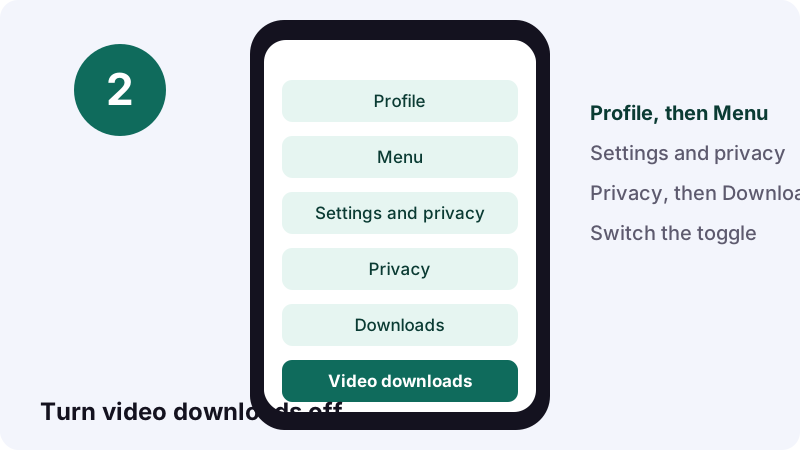
- Open your profile. In the TikTok app, tap Profile at the bottom.
- Open settings. Tap the Menu button at the top, then tap Settings and privacy.
- Go to Downloads. Tap Privacy, then tap Downloads.
- Switch it off. Turn the Video downloads setting off. New downloads of your past and future posts stop; earlier copies stay where they are.
Who saved my TikTok? The quick answer
You cannot see who saved your TikTok. TikTok's help pages describe no list of the people who favorited or downloaded a post, and they say a Favorites collection is visible only to the person who made it. Saves stay private on the viewer's side.
Quick answer: no names for saves, ever. What you can see is narrower: viewers through post view history, visitors through profile view history, and the accounts that watched your Story.
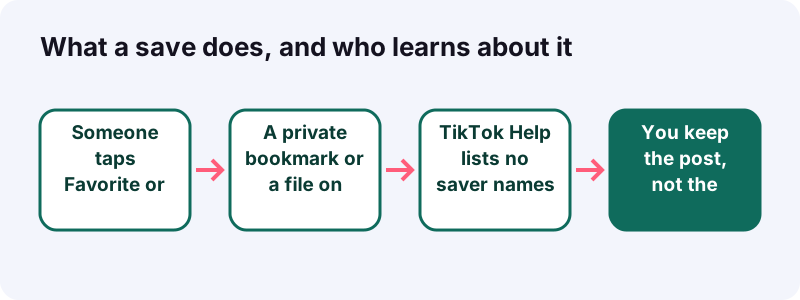
Picture it: your cooking clip is doing well, a cousin texts "saved it for Sunday," and you start wondering who else tucked it away. The honest reply to "who saved my TikTok" is that only the people who saved it know. Here is what you get instead.
- Favorites: private bookmark, no name sent to you.
- Save video downloads: a file on their phone, no name sent to you.
- Post view history: some viewer names, with conditions.
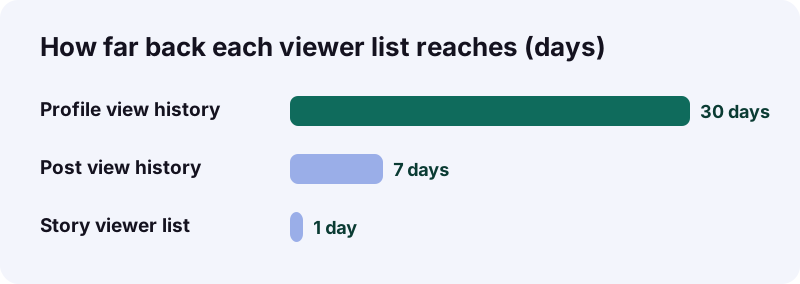
- Profile view history: some visitor names from the last 30 days.
- Story views: the full list of accounts that watched.
What does "saving" mean on TikTok?
On TikTok, "saving" can mean two separate actions: adding a post to your Favorites, or downloading the video to your phone. They behave very differently, so it helps to know which one people mean before you worry about it.
Favorite: the in-app bookmark
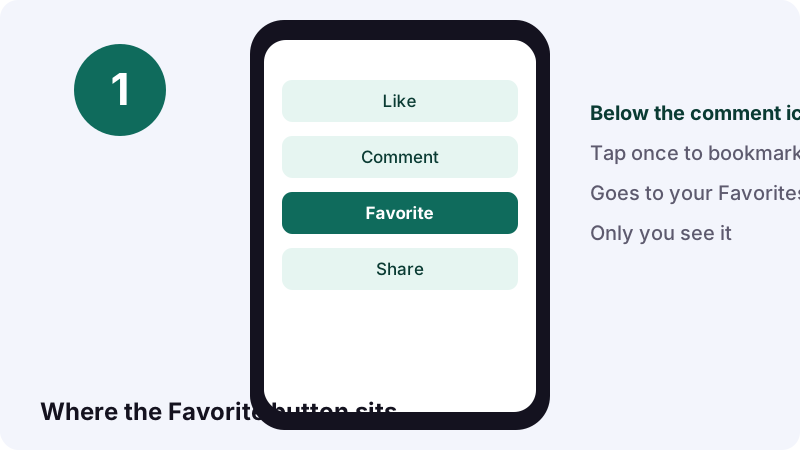
Tapping Favorite puts the post in a private collection inside TikTok, ready to rewatch or organize later. TikTok's Favorites page places the button directly below the comment button on phones; on a tablet you reach it through the Share menu.
Save video: a real file
Save video is a download. TikTok's guide to saving videos says it copies the video file straight to the phone's photo gallery, so the person can watch it offline or share it outside the app.
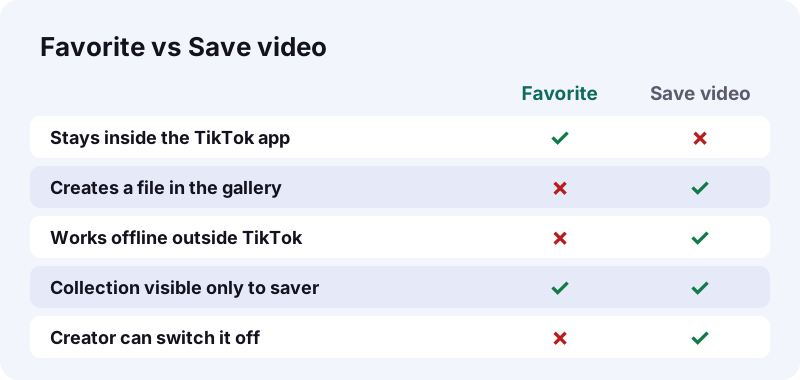
| Favorite | Save video | |
|---|---|---|
| Where it ends up | Favorites collection in TikTok | Phone gallery |
| Works offline | No | Yes |
| Creator can block it | Not described by TikTok Help | Yes, with the Video downloads setting |
| Visible to the creator | No, only the saver sees Favorites | No saver list described |
Can you see who added your post to their Favorites?
No. TikTok states that only you can see the content you have favorited, which means the person who bookmarks your video is the only one who sees that bookmark. There is no screen that turns those private collections into a list of names for the creator.
Why the list stays hidden
A Favorites collection works like a private shelf. If it named every saver, people would stop using it for recipes, workouts or videos they want to study. TikTok designed it so the shelf belongs to the viewer, not to you as the poster.
What a like or comment gives away instead
Interaction is a different story. TikTok's post view history rules say people who like or comment on your post show up as viewers, even if they do not follow you and even if their own setting is off. So a saver who also hits like is visible as a viewer, just not as a saver.
- Like: may show the person as a viewer.
- Comment: public, with their name.
- Favorite alone: nothing shown to you.
Can you see who downloaded your video?
No. Downloading happens on the viewer's phone, and TikTok's download help describes no notice or list sent to the creator. What you control is whether downloading is allowed at all, through the Video downloads setting on your account.
What the downloads setting changes
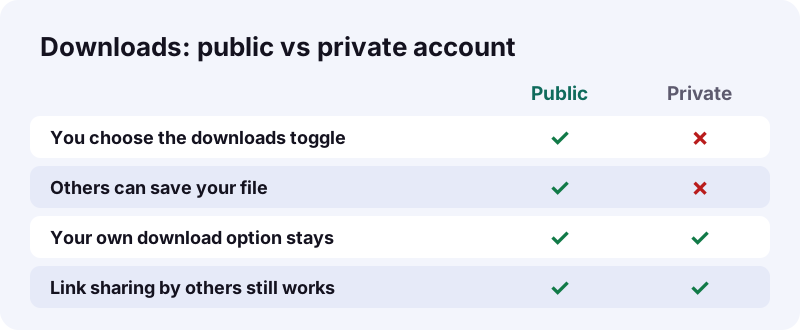
According to TikTok's Manage video downloads page, turning downloads on lets people save your posts, turn them into live photos or GIFs, and share them straight to other platforms. Turning it off removes those options for other people, while you keep them for your own posts.
“When you turn the video downloads setting off, people can't download videos or photos you've already posted or your future content.”
What it cannot undo
Copies made while downloads were on stay on those phones. People can also still pass your post along as a link or in direct messages. So the toggle shapes the future; it does not recall files that already left.
Which TikTok features do show viewer names?
Three features name real accounts: post view history, profile view history and Story views. None of them is about saving, and each has its own conditions, so a name in these lists means "watched" or "visited," never "saved."
| Feature | What you see | Time window | Main conditions |
|---|---|---|---|
| Post view history | Some people who viewed your posts | Posts from the last 7 days | Age 16+, under 5,000 followers, setting on |
| Profile view history | Accounts that visited your profile | Last 30 days | Age 16+, under 5,000 followers, both sides opted in |
| Story views | Total views and the accounts that watched | While the Story is up (24 hours) | None listed beyond posting a Story |
| Favorites | Nothing about other people | - | Private to the saver |
| Downloads | Nothing about who downloaded | - | You can only allow or block |
Post view history in one line
It shows viewers who follow you and also turned the feature on, plus people who liked or commented even if their setting is off, for posts from the last 7 days.
Profile view history in one line
Profile view history shows visits from the past 30 days, but only from accounts that also have the setting switched on. It is off by default.
Story views in one line
TikTok Stories help says you can see the total number of Story views and the accounts that watched, for a post that stays visible for 24 hours.
How do you turn on post view history?
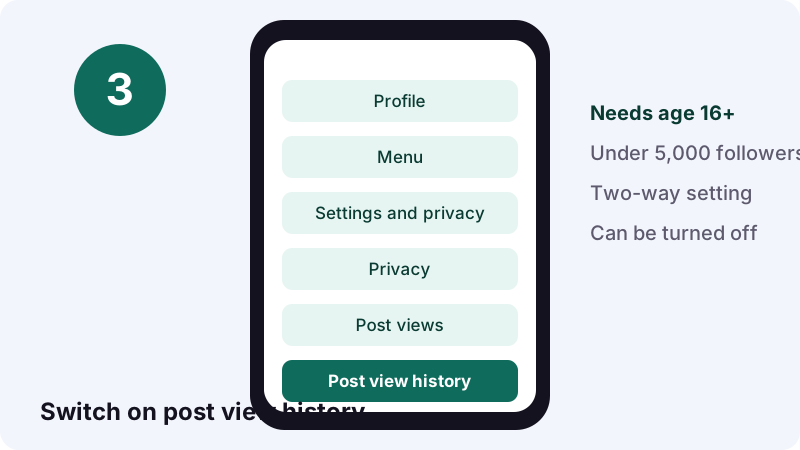
You switch it on under Privacy, then Post views. It is a two-way deal: once it is on, people you follow who also use it can see that you viewed their posts, so think about that before flipping it.
- Tap Profile at the bottom of the TikTok app.
- Tap the Menu button, then Settings and privacy.
- Tap Privacy, then Post views.
- Turn Post view history on or off.
Who gets this feature?
TikTok's post view history page says only people who are 16 or older and have fewer than 5,000 followers can use it. A bigger account simply will not see the option, which is a common reason people think the setting has vanished.
A catch worth knowing
Even with the setting off, your likes and comments on someone else's post still appear to them as views. Turning it off hides passive watching, not interaction.
How do you check who watched your Story?
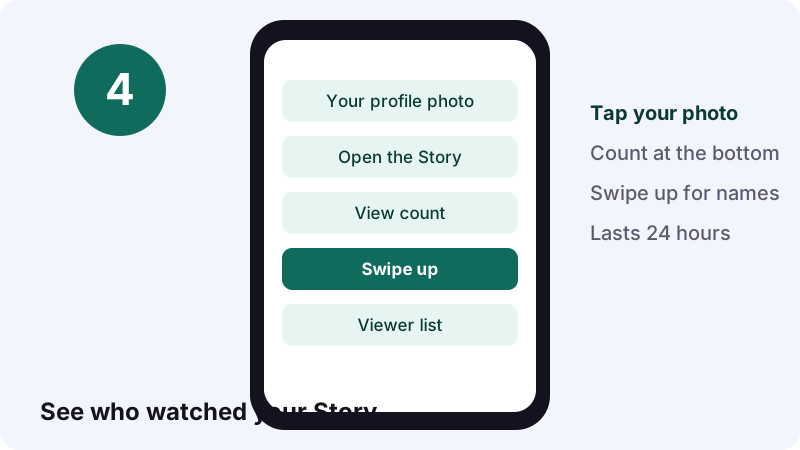
Open your own Story and swipe up. The total view count sits at the bottom of the Story, and swiping up shows the accounts that watched it. This is the most complete viewer list TikTok offers, and it works only while the Story is live.
- Tap your profile photo at the top of the Following feed, your inbox or your profile.
- Open the Story you want to check.
- Read the view count at the bottom.
- Swipe up to see the accounts.
Watching works the other way too. TikTok's Watching Stories page is blunt about it:
“Keep in mind that people can see you viewed their Story even if your account is private or your profile view history is turned off.”
Want to keep a public Story before it expires? Our TikTok story download page saves public Stories from a link.
Does TikTok Analytics name the people who saved?
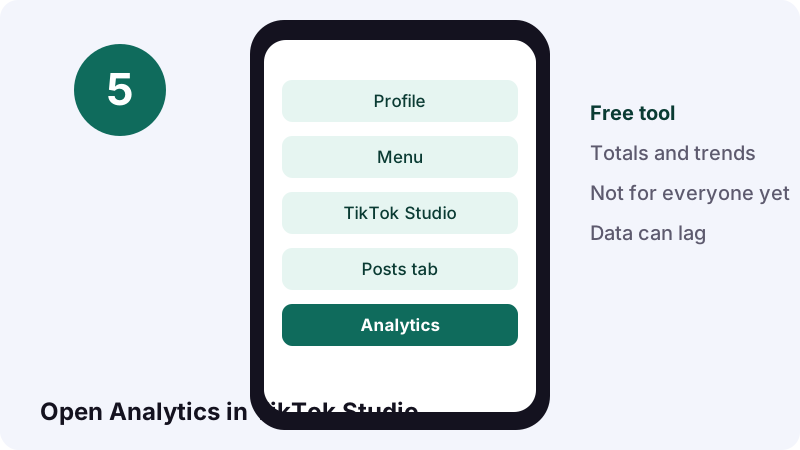
No. TikTok describes Analytics as a free tool for content performance, audience demographics and engagement trends. Those are totals and patterns about your audience as a group, not a roster of individual accounts who bookmarked or downloaded a post.
Opening Analytics
- Tap Profile.
- Tap the Menu button and choose TikTok Studio.
- Tap Analytics inside the Posts tab.
If you cannot find it
TikTok's Analytics help says the option is not available to everyone yet, and figures can be delayed depending on the post. Waiting a few days often clears up numbers that look wrong.
- Look under the Posts tab in TikTok Studio.
- Check again in a few days.
- Use the in-app Need more help? button if it still fails.
Three everyday situations, and what you would actually see
In each case below, the answer is the same: you might learn that someone watched or visited, but never that they saved. Real examples make the limits easier to remember than any rule.
Your friend says she saved your workout video
She tapped Favorite. It lives in her private collection. You see nothing new, unless she also liked or commented, which shows as an interaction.
A stranger downloads your recipe on the train
If your downloads are on, the file lands in their gallery. TikTok Help describes no alert for you. If downloads were off, the Save video button would not even appear for them.
A coworker watches your weekend Story
This one you do see. Swipe up on the Story within 24 hours and the coworker's account is in the list, even if their own account is private.
| Situation | Do you see a name? | Why |
|---|---|---|
| Friend favorites your post | No | Favorites are private to the saver |
| Stranger downloads your video | No | No saver list is described by TikTok |
| Someone watches your Story | Yes | Story views list the accounts |
| Someone visits your profile | Sometimes | Both of you need profile view history on |
Can you stop people from saving your posts?
You can stop downloads, not bookmarks. Turning off Video downloads blocks the Save video option on your posts; limiting a post's audience or going private shrinks who can see it in the first place. Favorites are not something TikTok Help says creators can switch off.
Turn off video downloads
- Tap Profile, then the Menu button.
- Tap Settings and privacy.
- Tap Privacy, then Downloads.
- Turn Video downloads off.
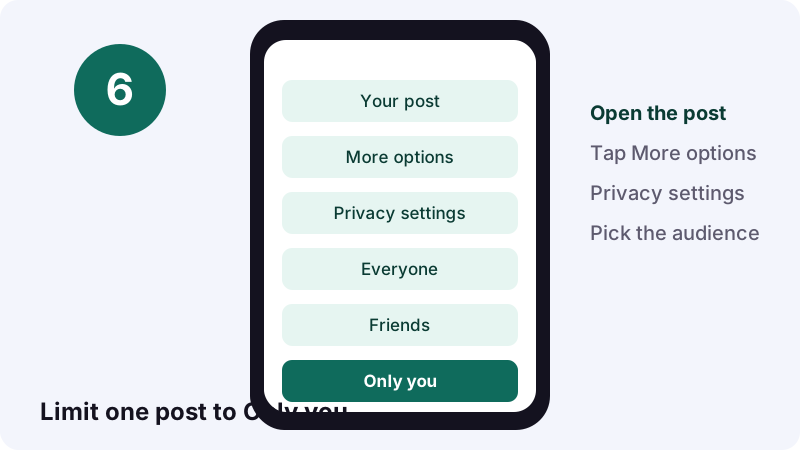
Limit a single post
Each post can have its own audience. TikTok's Post privacy settings page lets public accounts choose Everyone, Friends or Only you, and private accounts choose Followers, Friends or Only you.
Go private
If your account is private, or you are under 16, TikTok keeps video downloads off and you cannot turn them on. Switching back to public gives you the choice again.
Is there an app that shows who saved your TikTok?
Be very careful with any app or site that promises this. TikTok's help pages describe no saver list, so a third party has nothing official to read it from. These offers usually want your TikTok login, and that is the real price.
Red flags checklist
- It asks for your TikTok password or a login code.
- It wants you to install a profile, extension or APK first.
- It shows a "list" only after you pay or share a link.
- It names accounts that never interacted with you.
- It pressures you with a countdown.
TikTok's Account safety page lists phishing scams, malware and reused passwords among the ways passwords get leaked. A "who saved my TikTok" checker that asks for your password fits that pattern exactly.
Already typed your password into one?
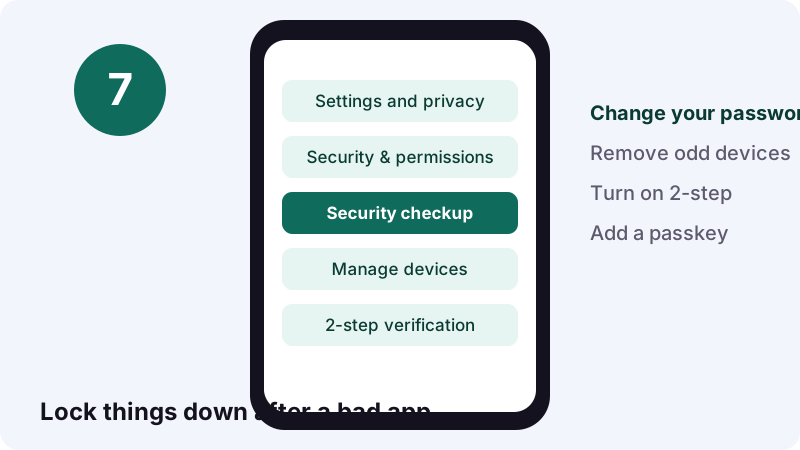
- Change your TikTok password right away; TikTok logs you out of other devices when you do.
- Open Security & permissions and tap Manage devices; delete any device you do not recognize.
- Turn on 2-step verification or add a passkey.
- Run Security checkup and finish each task.
Does saving with Tiktokioo.net tell the creator?
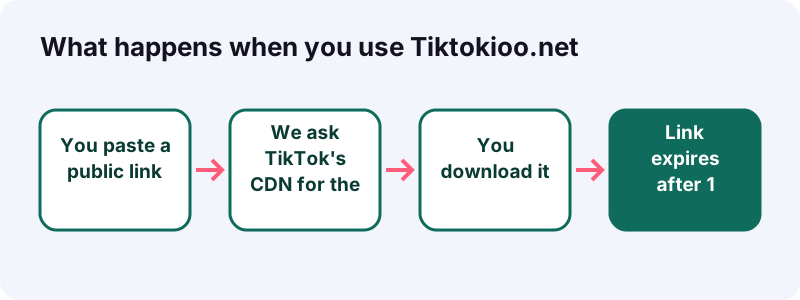
No. Our tool never logs into TikTok and never contacts the creator. You paste a public link, we fetch the file TikTok already serves from its own CDN, and the download link expires after 1 hour. Nothing is stored on our side.
What our tool can and cannot open
- Public videos as MP4 without the watermark, on the Tiktokioo.net home page.
- Sounds as audio with the TikTok MP3 converter.
- Every image of a slideshow with TikTok photo download.
- Not private posts, deleted posts, region-blocked posts or drafts.
- No TikTok account needed.
- No app to install.
- Works in any browser.
Usually the link resolves in about 0.6 to 1.8 seconds. If TikTok does not serve a file, we cannot get it either; there is no back door. Read our privacy page for exactly what we log.
Saving someone else's post? A short etiquette checklist
Saving for yourself is one thing; reposting a downloaded file is another. A few habits keep you on good terms with creators and with copyright, and they cost almost nothing.
- Keep personal saves personal; rewatching offline is the point.
- Ask before you re-upload someone's video anywhere else.
- Credit the creator by name if they say yes.
- Use TikTok's own Repost button to share inside the app; it keeps the creator attached.
- Respect a creator who turned downloads off.
Changed your mind about something you shared in-app? Our guide on how to remove a repost on TikTok walks through each button.
Where to go from here
If your real goal is keeping your own content safe, start with the downloads toggle and post privacy. If you want copies of public posts, Tiktokioo.net and the tools below handle each format.
Questions people ask
Who saved my TikTok, and can I find out?
You cannot find out. TikTok's help pages describe no list of the people who favorited or downloaded a post, and they say only the saver can see their Favorites.
Does TikTok tell me when someone downloads my video?
TikTok's download help describes no alert to the creator. You can only allow or block downloads with the Video downloads setting under Privacy.
Can people see the videos I put in my Favorites?
No. TikTok says only you can see the content you have favorited.
Why can't I find post view history in my settings?
TikTok limits it to people who are 16 or older with fewer than 5,000 followers. Larger accounts do not get the option.
If someone watches my Story, will I know?
Yes. Open your Story and swipe up to see the accounts that watched it while it is live, even if their account is private.
Does turning off downloads delete copies people already saved?
No. Videos downloaded while the setting was on stay on those devices. Turning it off only stops new downloads.
Are "who saved my TikTok" apps safe?
Treat them as a risk. TikTok has no official saver list to read from, and any app that asks for your password could expose your account.
Does TikTok Analytics show who saved a post?
No. Analytics covers performance, audience demographics and engagement trends, not individual accounts who saved.
Will the creator know if I save their video with Tiktokioo.net?
No. Tiktokioo.net does not log in to TikTok or contact anyone. It fetches the public file and the link expires after 1 hour.
Can I stop people from adding my posts to Favorites?
TikTok Help does not describe a setting for that. You can limit who sees a post with its privacy settings, or block downloads.
Guides
Downloader — Save a public TikTok as a clean MP4, no logo.
Sources
- Favoriting content on TikTok — TikTok Help Center
- How to save TikTok videos to your device — TikTok Help Center
- Manage video downloads — TikTok Help Center
- TikTok post view history — TikTok Help Center
- Profile view history — TikTok Help Center
- Watching Stories on TikTok — TikTok Help Center
- TikTok Stories — TikTok Help Center
- How to use TikTok Analytics — TikTok Help Center
- Post privacy settings — TikTok Help Center
- Account safety — TikTok Help Center