How to save a TikTok MP3 in three taps
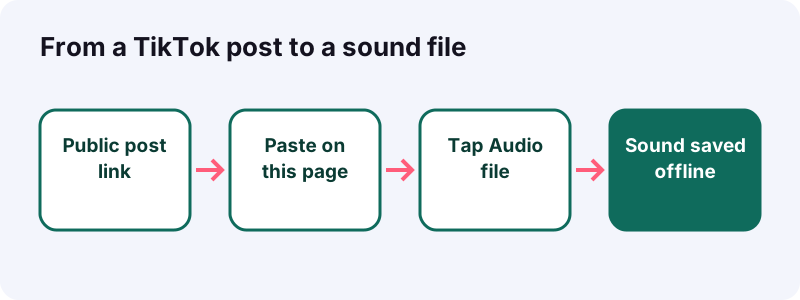
- Copy the post's link. In TikTok, open the post with the sound you like, tap the Share arrow and pick Copy link. On a computer, copy the address of the post from the browser bar.
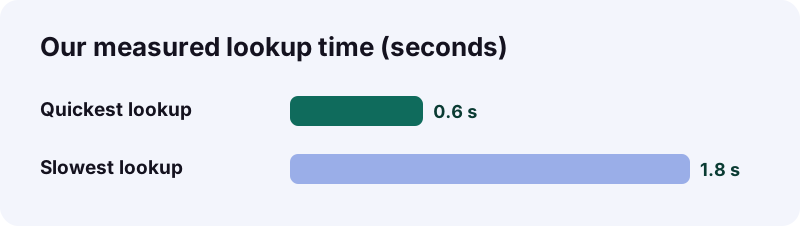
- Paste it into the box above. Come back to this page, tap the box and paste. Tiktokioo.net looks up the public post, which took between 0.6 and 1.8 seconds in our tests.
- Tap the audio button. Choose Audio file and confirm the save. The file usually ends in .m4a or .mp3. Grab it within an hour, because the link expires after that.
Quick answer: what happens when you paste a TikTok link here?
You get the post's soundtrack as a separate audio file, without the picture. Tiktokioo.net reads the public post, asks TikTok's own servers for the audio track and hands you a download button. The whole lookup took 0.6 to 1.8 seconds in our tests.
Quick answer: copy the TikTok link, paste it above, tap Audio file. The TikTok MP3 or M4A file lands in your downloads. Free, no login, no app.
Nothing passes through an account. We never ask for your TikTok password, and we never sign in to TikTok on your behalf. That also explains the main limit: if a logged-out visitor can't hear the post, we can't fetch its sound either.
When does a TikTok MP3 beat a saved video?
Whenever you only care about what you hear. An audio file is tiny, plays with the screen off and slots straight into editing apps. Here are five moments we hear about all the time.
- The bus with no signal. You found a chill lo-fi loop at home, and the commute has no coverage. A saved sound plays offline.
- Dance practice in the living room. You need the track on repeat through a speaker, not a video with the steps already done for you.
- The class presentation. Your teacher allows a 10-second clip of a quote you heard on TikTok. A small audio file is easier to embed than a whole video.
- The birthday slideshow. Your friend group has an inside-joke sound, and you want it under the photos at the party.
- The language learner. A creator explains a phrase in Spanish and you want to replay just the voice while you walk.
In each case the video part is dead weight. A 15-second sound came out at roughly 0.25 MB in our tests, so a whole folder of them takes less room than one short clip.
And when should you save the full video instead?
Grab the video when the visuals matter, such as a recipe, a tutorial or a meme where the joke is on screen. Our video downloader without the watermark handles that, and the same link works on both pages.
What should you check before you paste?
Spend twenty seconds on this checklist and you'll skip most failed attempts. Every item comes from how TikTok shares files with the public web.
- Open the post while logged out, or in a private browser tab. If it plays, it's public.
- Make sure it's still online. A deleted post has no file left to fetch.
- Copy the whole link, from https to the end. Half a link points nowhere.
- Check that it isn't a draft. Drafts stay on the creator's phone and never reach the web.
- Plan to save the file right away. Our download links expire after one hour.
One setting sits outside your control. TikTok's help center explains that creators can switch off downloads, and that for private accounts and users under 16 the downloads setting is off by default. If TikTok won't serve a file, no TikTok MP3 tool can conjure one.
Tip: copy the link with TikTok's own Share button. Typing it by hand invites typos.
How do you pull the sound out, device by device?
The idea is the same everywhere: copy the post's address, paste it here, tap the audio button. Only the copy step and the place the file lands change between a phone and a computer.
Phone in one hand (iPhone or Android)
- In the TikTok app, open the post and tap the Share arrow.
- Tap Copy link.
- Switch to Safari or Chrome and open this page.
- Tap the box at the top, then Paste.
- Tap Download, then Audio file, and confirm.
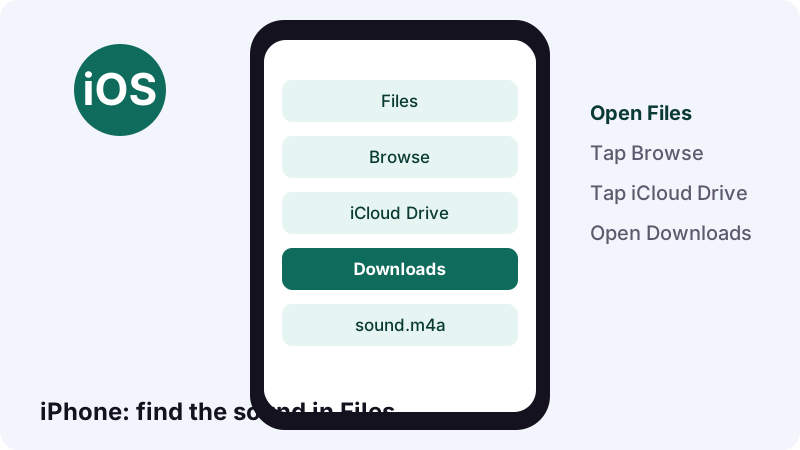
On iPhone, Apple's guide says that files downloaded from the internet go to the Downloads folder in the Files app, and that Safari also has a Downloads button next to the search field. See Apple's page on finding downloads.
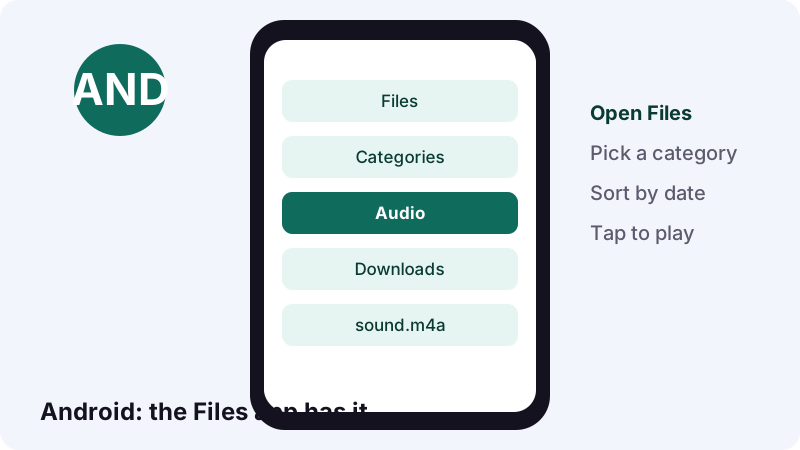
On Android, Google says your files usually sit in the Files app, though your phone maker may ship a different app. Sort by date and your new sound sits on top. Google's find and delete files guide shows the menus.
At a desk (Windows, Mac or Chromebook)
- Open the TikTok post in your browser and copy the address bar.
- Paste it into the box on this page.
- Click Audio file.
- Open the file from the download tray, or drag it into your editor.
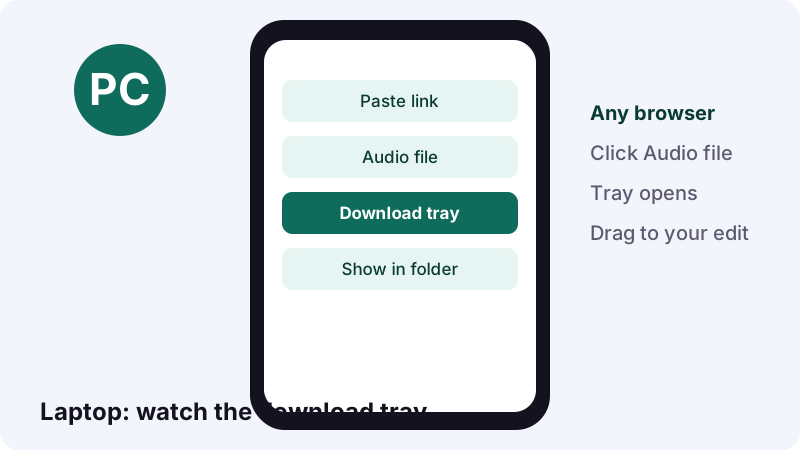
Chrome's help center says the file is saved in your default download location, and that the Download tray opens once it finishes. Read Google's download help if you want to change that folder. Mac owners have a dedicated guide to saving TikTok on a Mac.
What does a saved TikTok MP3 file look like?
Expect a small audio file that ends in .m4a or .mp3, a few hundred kilobytes for a short sound. We don't re-encode it, so you get the track TikTok stores, at the quality TikTok stores it.
| Detail | What we see | Why it matters |
|---|---|---|
| Extension | .m4a most often, sometimes .mp3 | Both play on current phones and computers |
| Size | About 0.25 MB for 15 seconds | Hundreds of sounds fit in very little space |
| Length | Same as the sound used in the post | We don't cut or loop it |
| Source | TikTok's own content servers | No copy is kept on Tiktokioo.net |
| Link lifetime | 1 hour | Save it now, not tomorrow |
A sound that came from TikTok's music library and an "original sound" recorded by the creator both come out the same way: one mixed track. We can't split the voice from the music, and no button on this page claims to.
Why don't we just convert everything to MP3?
Because each conversion between lossy formats throws away a little more detail. Keeping the file TikTok already made gives you the cleanest copy. If a device really insists on MP3, convert once, at the end, from this original.
Will an .m4a file get in the way of your plans?
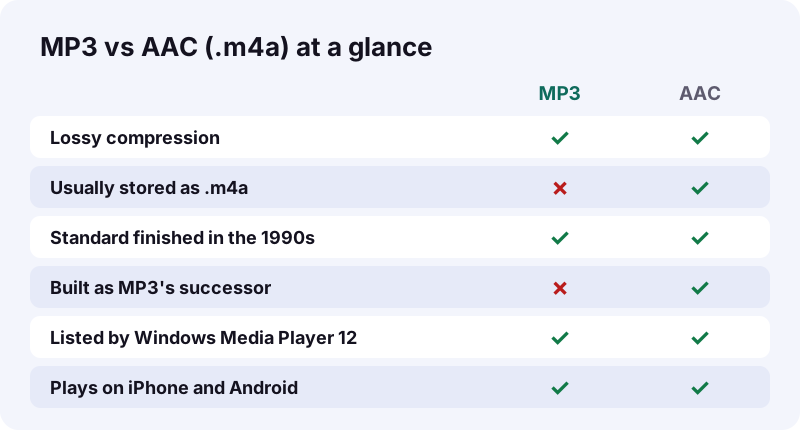
Almost never. An .m4a is simply an MPEG-4 file that carries only audio, which Wikipedia notes is the usual extension for audio-only MPEG-4 files. Phones, browsers and most editors open it directly.
“.m4a (audio only) is often compressed using AAC encoding (lossy), but can also be in Apple Lossless format.”
Microsoft's list of formats for Windows Media Player 12 includes the MP4 Audio file (.m4a), as you can see on Microsoft's file types page. So even an older Windows laptop will usually play your TikTok MP3 alternative without extra software.
| What you want to do | Works with .m4a? | Note |
|---|---|---|
| Listen on iPhone or iPad | Yes | Opens from Files |
| Listen on Android | Yes | Wikipedia lists Android among AAC players |
| Play in Windows Media Player 12 | Yes | Listed by Microsoft |
| Use in VLC on any computer | Yes | Wikipedia lists VLC among AAC players |
| Make an iPhone ringtone | Needs .m4r | iPhone ringtones use the .m4r extension |
| An old player that reads MP3 only | Convert once | MP3 has the widest hardware support |
That iPhone detail surprises people: Wikipedia's MP4 article says the iPhone uses MPEG-4 audio for ringtones but with the .m4r extension instead of .m4a. Same family, different label.
Why do two audio formats exist in the first place?
Because one was built to replace the other, and the old one never left. MP3 came first and spread with early music sharing; AAC arrived later with better sound at the same bit rate. TikTok sounds usually travel as AAC inside an .m4a file.
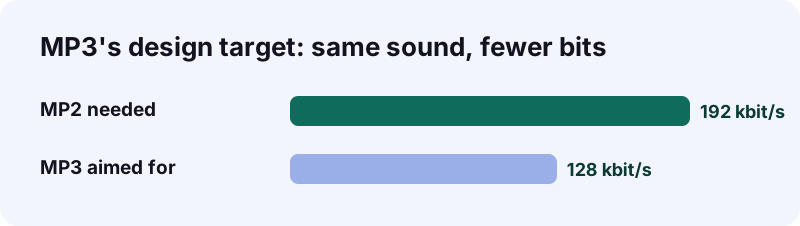
According to Wikipedia's MP3 article, the team behind MP3 wanted it to match at 128 kbit/s what the older MP2 needed 192 kbit/s to achieve. The Fraunhofer team picked the .mp3 extension on 14 July 1995.
| Date | What happened | Source |
|---|---|---|
| 7 July 1994 | First software MP3 encoder, l3enc, released | Wikipedia, MP3 |
| 14 July 1995 | The .mp3 file extension chosen | Wikipedia, MP3 |
| April 1997 | AAC declared an international standard | Wikipedia, AAC |
| 1997 | First store selling AAC songs, by AT&T Labs | Wikipedia, AAC |
Wikipedia's AAC article explains that AAC was designed as MP3's successor and generally sounds better at the same bit rate. It also notes that MP3 kept near-universal support because it was the format of choice in the early years of music sharing online.
Does the encoder matter more than the file name?
Often, yes. Two files can both say .mp3 and still sound very different, because the software that made them matters. That's a good reason to keep the original TikTok MP3 or M4A file instead of chasing a different extension.
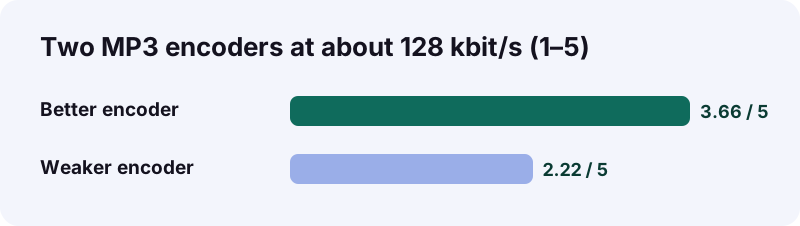
Wikipedia describes a public listening test of two early MP3 encoders, both set to about 128 kbit/s. One scored 3.66 on a 1 to 5 scale; the other scored only 2.22. Same format, same bit rate, a big gap in quality.
What does this mean for your saved sounds?
- Keep the file exactly as it came from TikTok.
- If you must convert, do it once, with a well-known app.
- Never convert MP3 to M4A and back again. Each lossy pass drops detail.
- Trust your ears over the number in the file name.
Where did your TikTok MP3 go? A finder for every device
It went to your browser's download folder. The table below shows where to look, based on Apple's and Google's own help pages. If you still can't spot it, search your device for ".m4a".
| Device | Where to look | Help page |
|---|---|---|
| iPhone or iPad | Files, then Browse, iCloud Drive, Downloads | Apple Support |
| iPhone, right after saving | The Downloads button next to Safari's search field | Apple Support |
| Android phone | Files app, sorted by date | Android Help |
| Computer with Chrome | Default download location, or More, then Downloads | Chrome Help |
How do you move it from phone to computer?
Send it to yourself in a chat, put it in your cloud drive, or connect a cable. Google's Android help says that when your phone is connected by USB, you can open the computer's Downloads folder to find files from the device.
- Share it to your own email or chat for a quick hop.
- Upload it to a cloud folder you already use.
- Use a USB cable and pick File Transfer on Android.
What can TikTok's own sound tools do without any download?
Quite a bit, if you only want to reuse a sound inside TikTok. TikTok's Sounds help page explains how to add a sound to your post, save it with the Favorites button and trim it with a slider. A downloaded file matters once you leave the app.
- Favorites: tap Favorites on a sound to keep it for your next post.
- Trim: drag the slider to pick the starting point of the sound.
- Search: use Search on the Add sound screen to find a sound by name.
A TikTok MP3 file on your device covers everything else: offline listening, outside editors, a school project or a playlist. Read the steps on TikTok's Sounds help page if you only need the in-app route.
Business accounts, take note: TikTok says that a Business Account cannot use music that isn't licensed for commercial use.
The audio button didn't show up. What now?
Usually the post is private, deleted, blocked in your region or the link is incomplete. Work through the four checks in the diagram, in order. Each one takes a few seconds.
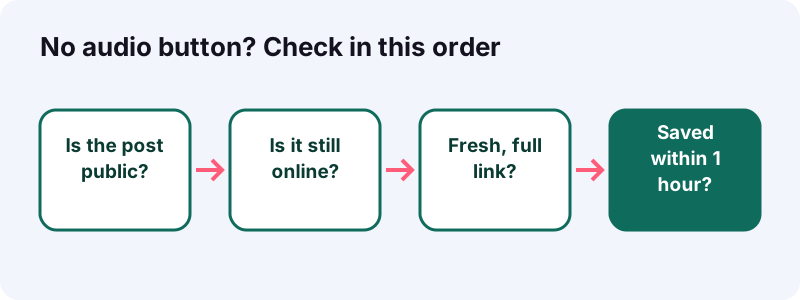
| What you see | Likely reason | Try this |
|---|---|---|
| "We couldn't open that post" | Private, deleted or region-blocked | Open it logged out to confirm |
| "Doesn't look like a TikTok link" | Part of the address is missing | Copy the link again with Share |
| Download button does nothing | The link is older than 1 hour | Paste the TikTok link again |
| File won't open on an old player | Player reads MP3 only | Convert once, keep the original |
- Reload this page and try once more.
- Switch from Wi-Fi to mobile data, or the other way round.
- Try a different browser, such as Chrome instead of an in-app browser.
Still stuck? Tell us what you pasted on the contact page and we'll take a look.
Who decides whether a sound can be downloaded?
The creator and TikTok, not us. TikTok's help center describes a Video downloads setting that each creator can switch on or off, and some accounts have it off by default.
- Private accounts: the setting is off by default and can't be turned on.
- Users under 16: also off by default.
- Public accounts: the creator chooses on or off.
- Turning it off later doesn't remove copies people saved earlier.
Those points come straight from TikTok's page on managing video downloads. We respect the same line: Tiktokioo.net only reaches what TikTok serves to the public, and never anything behind a login. That's the whole rule.
Can someone see that you saved their sound?
We don't sign in to TikTok and we don't notify anyone. Curious about what TikTok itself shows creators? Our guide on who saved my TikTok covers it.
Can you use the sound in your own project?
Keeping a TikTok MP3 for private listening rarely bothers anyone. Publishing it is different: the person who made the sound, or the label behind the song, owns it. The U.S. Copyright Office says a work is under copyright from the moment it's created and fixed in a tangible form.
- Personal playlist or offline listening: low risk.
- A class project with credit: often fine, check your school's rules.
- Reposting the sound on another platform: ask the creator first.
- Ads or sponsored posts: get a proper license.
Registration is optional, the Copyright Office FAQ adds, so "I couldn't find a registration" doesn't mean a sound is free to use. When in doubt, ask, and credit the creator by handle. Our terms and DMCA page explain how we handle complaints.
What does Tiktokioo.net keep from your visit?
No sound files and no TikTok login. Your file streams from TikTok's own servers to your device, and the download link dies after one hour. We don't build a library of anyone's audio.
- No account to create.
- No app to install, no browser extension.
- No stored copy of your TikTok MP3 on our side.
- No TikTok password, ever.
The full details sit in our privacy policy, and the people behind the site are introduced on the about page. Tiktokioo.net is independent and has no connection with TikTok or ByteDance.
Which Tiktokioo.net page fits your next job?
This TikTok MP3 page is for sound only. The same link works on our other tools, so pick the one that matches the file you want.
- Video without watermark: the full clip as a clean MP4.
- Photo post images: every picture of a slideshow, one file each.
- Story download: public stories before they vanish.
- Drafts: what TikTok lets you do with your own unposted videos.
Photo posts carry a soundtrack too. Paste a slideshow link here and you get its audio, or use the photo tool for the pictures plus the sound.
Can you save several sounds in a row?
Yes. Paste one link, save the audio, then paste the next. Each lookup is separate, so a playlist of ten sounds is ten quick rounds. Rename each file right away so you remember which post it came from.
Questions people ask
Is this TikTok MP3 converter really free?
Yes. There's no price, no trial and no sign-up. You paste a public link and save the sound.
Can I keep a TikTok MP3 for a flight with no Wi-Fi?
Yes. Save the audio file before you leave. It plays offline from your Files or Downloads folder, like any other audio file.
Why is my file an .m4a and not an .mp3?
TikTok usually stores sounds as AAC audio in an .m4a file. We hand you that original instead of re-encoding it, which keeps the best quality. Current phones and Windows Media Player 12 open .m4a.
Can I get the voice without the background music?
No. You get one mixed track, exactly as TikTok stores it. Separating a voice from music is a job for an editing app, and the result is rarely clean.
How large is a TikTok MP3 file?
Small. A 15-second sound came out at about 0.25 MB in our tests, so a longer sound grows from there.
Does it work with photo slideshows?
Yes. Photo posts return their images plus the audio. Paste the slideshow link here for the sound, or use the photo tool for the pictures.
Why did the download stop working an hour later?
Our links expire after one hour, and nothing is stored on our side. Paste the TikTok link again for a fresh one.
Can I make a ringtone from a TikTok MP3 file?
Possibly. Wikipedia notes that iPhone ringtones are MPEG-4 audio with the .m4r extension, so an .m4a sound is close but needs exporting as a ringtone. Keep it to personal use.
Can a business account use the saved sound in an ad?
Be careful. TikTok says Business Accounts cannot use music that isn't licensed for commercial use. For ads, get a license from the rights holder.
Do I need to log in to TikTok?
No. We only read what a logged-out visitor can see. That's also why private posts and drafts don't work.
Is Tiktokioo.net run by TikTok?
No. Tiktokioo.net is an independent website. It has no connection with TikTok or ByteDance.
Sources
- Sounds — TikTok Help Center
- Manage video downloads — TikTok Help Center
- Find & delete files on Android — Android Help
- MP3 — Wikipedia
- Advanced Audio Coding — Wikipedia
- MP4 file format — Wikipedia
- File types supported by Windows Media Player — Microsoft Support
- Where to find downloads on your iPhone or iPad — Apple Support
- Download a file — Google Chrome Help
- Copyright FAQ: general information — U.S. Copyright Office