Save a copy of a TikTok draft to your phone
- Open the draft. Go to your Profile, open the videos tab and tap your Drafts, then open the draft you want to keep.
- Tap Save while editing. Inside the editor, a Save button on the side panel stores the post on your phone, per TikTok Help.
- Or turn on Save to device. Go to the Post screen, tap More options and switch Save to device on, so a copy lands on your phone when you post.
- Post privately if you must post. If you use the posting route, choose Only you in the privacy setting so nobody else sees it.
- Check the file and back it up. Open your gallery, play the copy, look at the corners, then back it up with iCloud Photos or your Android photo app.
Can a website save TikTok draft without watermark files for you?
No. A draft is not a public post, so it has no link, and no downloader can open it. To save TikTok draft without watermark worries, you have to use TikTok's own buttons inside the app.
Quick answer: open the draft and tap Save on the editing side panel, or turn on Save to device under More options and post it as Only you. Then check the copy in your gallery.
We say this plainly because plenty of pages promise to "download drafts" from a link. Tiktokioo.net cannot do that, and neither can any other site. Our free TikTok downloader handles public posts only.
What is a TikTok draft, and who can see it?
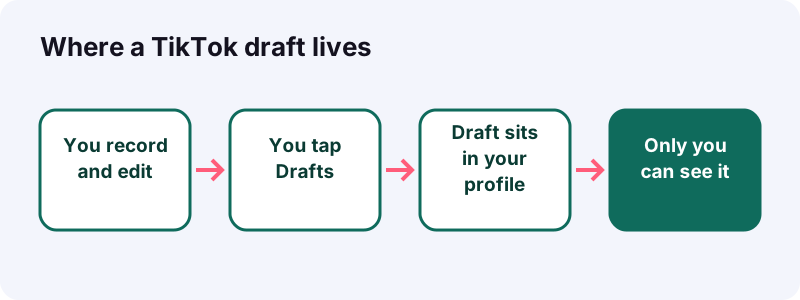
A draft is a recorded and edited post you parked instead of publishing. According to TikTok Help, nobody but you sees a draft on your profile until the moment you publish it.
On the Making a post help page, TikTok shows the Drafts button on the final screen for videos, photo posts and even text posts. So a draft can be any of the three.
What you can park as a draft
- A recorded or uploaded video with your edits.
- A photo post (TikTok allows up to 35 photos).
- A text post with stickers and background color.
| Post type | Where the Drafts button sits (TikTok Help) |
|---|---|
| Video | Final screen: tap Post to publish or Drafts to save |
| Photo post | Final screen: tap Post or Drafts |
| Text post | Tap the Drafts button to save and edit it later |
Why do drafts disappear, and why should you save them now?
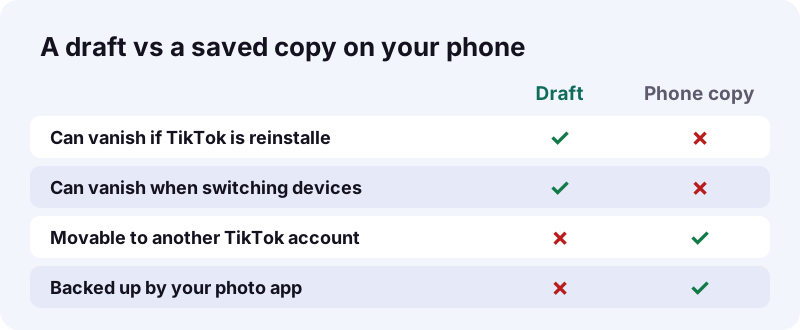
Because TikTok itself lists ways they can vanish. Reinstalling the app or moving the account to another device can remove them, and they cannot be shared between accounts.
“Keep in mind drafts can't be shared or transferred between various accounts.”
| What happens | Effect on your drafts (per TikTok Help) |
|---|---|
| TikTok is uninstalled, then reinstalled | Drafts may be removed |
| The account moves or switches to a different device | Drafts may be removed |
| You switch to another TikTok account | No sharing or moving between accounts |
| You post the draft | It becomes visible according to its privacy setting |
Picture it: your phone is acting up, a friend says "just reinstall TikTok", and five drafts go with it. Saving a copy first takes thirty seconds.
- Before reinstalling TikTok.
- Before switching to a new phone.
- Before logging into a different account on the same phone.
Route A: how do you use the Save button while editing?
Open the draft, stay in the editor and tap Save on the side panel. TikTok's download help page names this option for a single photo or video post, and it does not require posting.
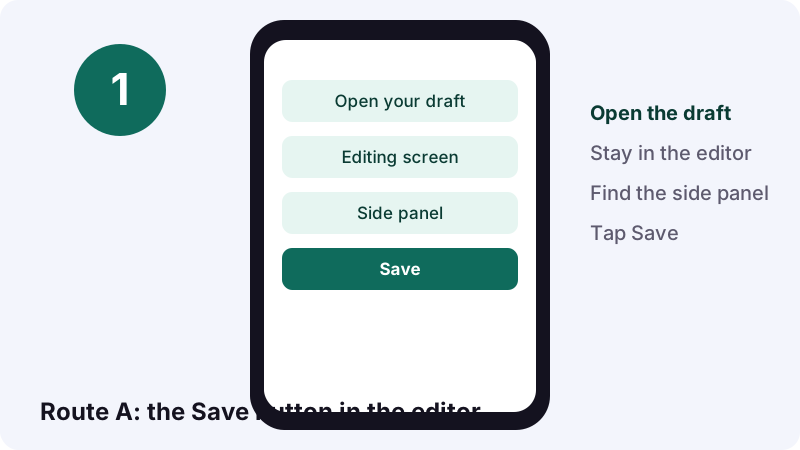
“You can also tap Save on the side panel while editing to download a single photo or video post.”
Checklist for Route A
- Update TikTok first, so your buttons match the help page.
- Open the draft from your profile's videos tab.
- Look for Save on the side panel of the editor.
- Wait for the save to finish before leaving the screen.
- Open your gallery and play the file.
If you cannot spot the button, the side panel may be scrolled; TikTok moves icons around between versions. Route B below works as a backup.
Route B: how does the Save to device switch work?
It saves a copy to your phone when you post. On the Post screen, tap More options and turn Save to device on; TikTok recommends this so you have offline copies of your content.
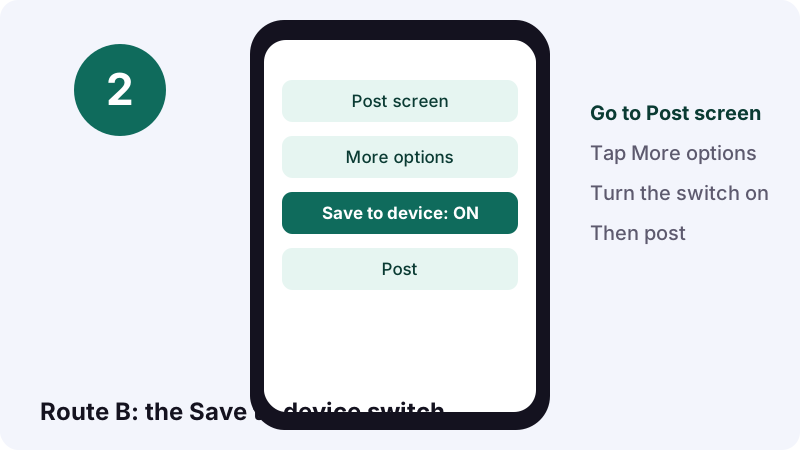
- Open the draft and continue to the Post screen.
- Tap More options.
- Turn the Save to device setting on.
- Set the privacy to Only you (next section).
- Tap Post, then check your gallery.
The Download content page describes both the switch and the Save button, so you can pick whichever your app version shows.
How do you post a draft as Only you?
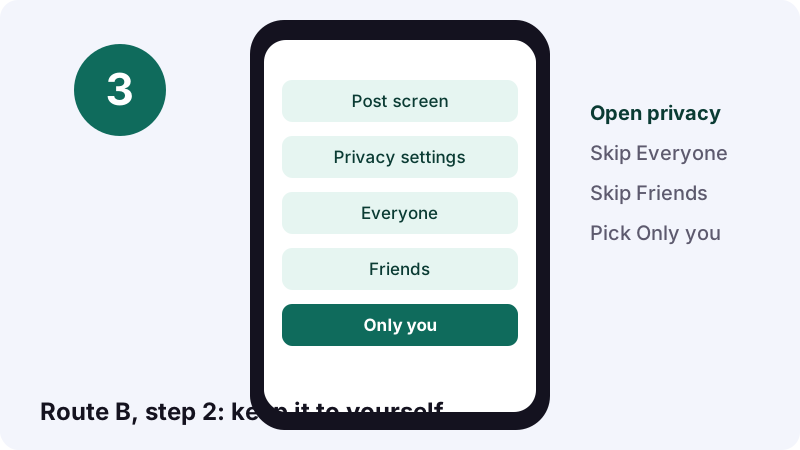
Pick Only you in the privacy options before you tap Post. TikTok says public accounts can choose Everyone, Friends or Only you, while private accounts choose Followers, Friends or Only you.
| Account type | Privacy choices TikTok offers |
|---|---|
| Public account | Everyone, Friends (followers you follow back), Only you |
| Private account | Followers, Friends (followers you follow back), Only you |
TikTok's Post privacy settings page adds that some younger users may have Only you set by default, depending on age and location.
- Everyone: people on or off TikTok (public accounts).
- Followers: available on private accounts.
- Friends: followers you follow back.
- Only you: nobody else.
What is the privacy trap after an Only you post?
Your next post copies the privacy of the last one. If you post a draft as Only you, the following upload will also be Only you until you change it.
“Your new posts will retain your previous post's privacy setting.”
That is the classic Friday-night mistake: you post your real video, wait for views, and nothing happens because it went out as Only you. Check the privacy line every time after using Route B.
Two-second habit
- Before tapping Post, read the privacy setting out loud.
- After a private save, switch back to Everyone for your next real post.
Where do you find a post you made private?
Tap the Lock icon on your profile. TikTok Help says only public videos appear in the posts tab, and private ones sit behind the Lock.
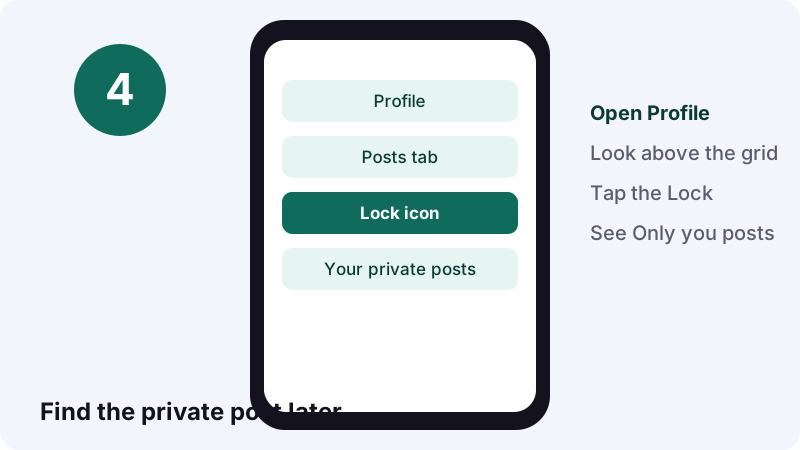
From there you can change the privacy of an existing post through More options, then Privacy settings. TikTok notes the view count does not reset when you change privacy.
- Profile, then the post you want to update.
- Tap More options … on the side.
- Tap Privacy settings (you may need to swipe left).
- Pick who can view it.
Does the saved copy carry a TikTok watermark?
TikTok's help pages do not say either way for drafts saved with these two routes. So the honest way to save TikTok draft without watermark doubts is to test it: save a short draft, open it in your gallery and look at the corners.
A visible watermark is a mark laid over the picture itself. Wikipedia's digital watermarking article notes traditional watermarks may be applied to visible media like images or video, which is why you can spot one just by watching.
A quick watermark test
- Record a three-second test clip and save it as a draft.
- Save it with Route A, then with Route B as Only you.
- Play both copies full screen in your gallery.
- Pause near the start and the end, where logos tend to show.
- Keep the route that gives you the cleaner file.
We will not promise you a logo-free file from TikTok's own buttons, because TikTok does not promise it either. Test once, and you will know for your app version.
When is screen recording a draft worth it?
Only when the Save options are missing. A screen recording captures whatever is on screen, so expect lower quality and any on-screen buttons in the frame.
- The editor shows no Save button.
- The Save to device switch is missing in your app version.
- You only need a rough reference copy, not the final file.
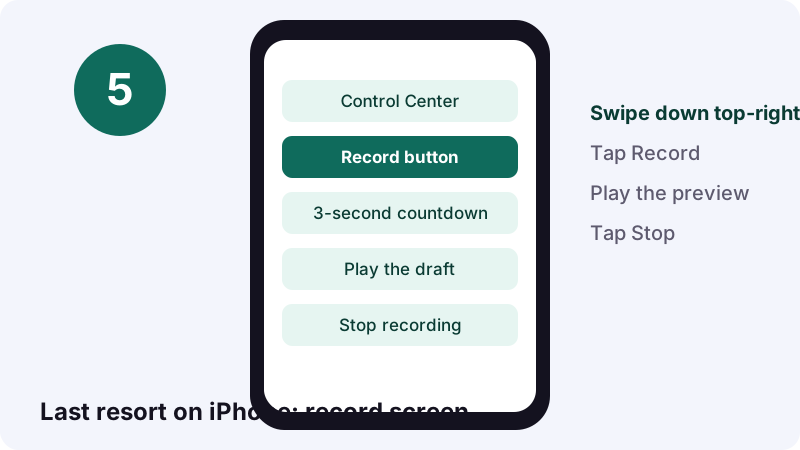
On iPhone, Apple's screen recording guide says to swipe down from the top-right corner, tap the gray Record button, then give it three seconds to start. Apple adds a caveat: certain apps block recording of their sound or picture.
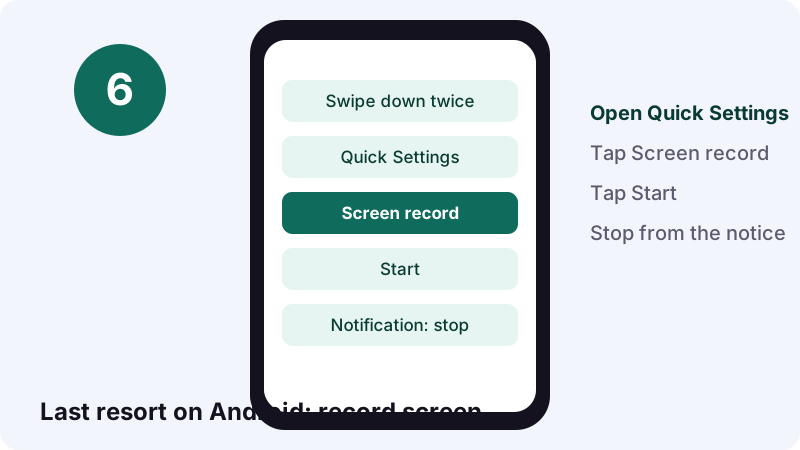
On Android, Google's screenshot and screen record page says to swipe down twice, tap Screen record, choose what to record and tap Start.
| Step | iPhone (Apple Support) | Android (Android Help) |
|---|---|---|
| Open controls | Swipe down from top-right | Swipe down twice from the top |
| Start | Tap the gray Record button | Tap Screen record, then Start |
| Sound | Tap and hold Record, then tap Microphone | Choose whether to record audio before starting |
| Stop | Tap the Screen Recording button, then Stop | Tap the Screen recorder notification |
| Find the file | Photos app, Library | Photos, Collections, On this device, Movies |
Which way should you pick?
Start with the Save button, fall back to an Only you post, and keep screen recording for emergencies. That order keeps quality high and keeps your account tidy.
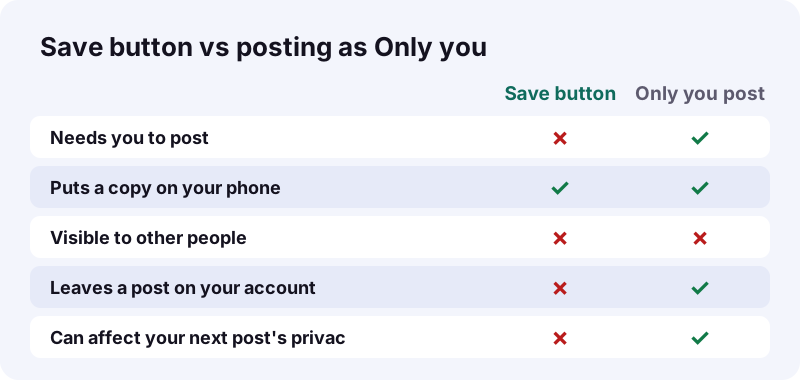
| Route | Posts anything? | Best for | Watch out for |
|---|---|---|---|
| Save button in editor | No | One draft, quickly | Button may sit lower on the side panel |
| Save to device + Only you | Yes, privately | When the Save button is missing | Next post inherits Only you |
| Screen recording | No | Emergencies only | Lower quality, on-screen buttons |
| Post publicly + Tiktokioo.net | Yes, to everyone | Clips you meant to publish anyway | Everyone can see it |
- One draft, right now: Save button.
- No Save button: Only you post with Save to device.
- Nothing works: screen record.
- Meant to be public anyway: post it, then use our tool.
Can Tiktokioo.net help once the video is public?
Yes, but only after you post it publicly. Paste the public link on our home page and you can save an MP4 without the logo, or an HD copy when TikTok serves one.
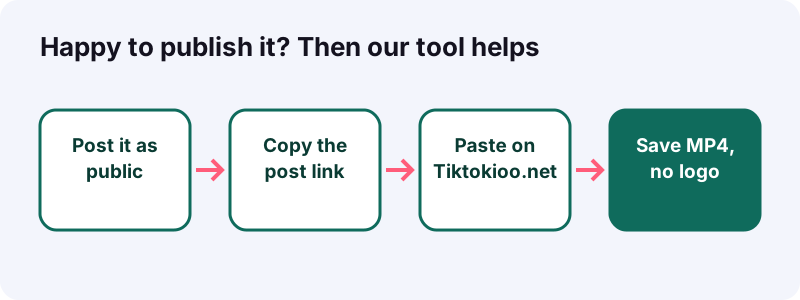
- Only you, Friends-only and private-account posts cannot be opened.
- Download links expire after one hour, and we store nothing.
- The HD file is often H.265 (HEVC), which plays on recent phones and computers.
- Need only the music or voice-over? Try the TikTok MP3 converter.
- Made a photo post? The photo downloader saves each image.
If you would rather keep the video private, stay with Route A or B. We would rather you lose a feature than lose control over who sees your work.
How do you back up saved drafts so they survive a new phone?
Let your photo app sync them. Once the copy is in your gallery, it no longer depends on TikTok, and a cloud photo backup carries it to your next phone.
Apple's iCloud Photos guide says it keeps photos and videos in their original formats at full resolution, listing HEVC and MP4 among them. Turn it on under Settings, your name, iCloud, Photos.
- iPhone: turn on iCloud Photos with the same Apple Account on every device.
- Android: Android Help says screen recordings sit in Photos under Collections, On this device, Movies; copy saved drafts somewhere safe too.
- Computer: copy the files to a folder named by date, so you can find them later.
- On a Mac? Our guide to saving TikTok on a Mac covers the desktop side.
What if you posted a draft by accident?
Change its privacy to Only you, or delete it and restore it later if needed. TikTok keeps deleted posts for up to 30 days in Recently deleted.
- Profile, then Menu ☰, then Settings and privacy.
- Select Activity center, then Recently deleted.
- Tap the post and choose Restore.
TikTok says a restored post comes back with its comments and likes. One exception: a Duet or Stitch cannot be recovered if the original creator deleted the source video.
- Quick fix: switch the post to Only you.
- Bigger fix: delete it, knowing you have 30 days to restore.
- Either way, your view count stays as it was.
What doesn't work, so you can skip it?
Anything that asks for your TikTok login to fetch drafts, or claims to pull them from a link. Drafts are not published, so there is nothing for an outside site to fetch.
Skip these
- Sites that want your TikTok password to "export drafts".
- Apps promising to move drafts to another account; TikTok says that is not possible.
- Reinstalling TikTok to "fix" a draft, which can remove drafts.
- Waiting until your phone is full or broken.
A five-minute routine to protect every good draft
Save, check, back up, and note what you saved. Do it every time a draft is good enough that you would hate to remake it.
Your routine
- Save the draft with Route A, or Route B as Only you.
- Play the copy in your gallery.
- Confirm your photo backup ran.
- Reset the privacy for your next real post.
- Delete old drafts you no longer need, after saving them.
When you are ready to share the finished video, post it publicly and save a clean copy with the Tiktokioo.net downloader. Tiktokioo.net is an independent tool and is not affiliated with TikTok or ByteDance.
Questions people ask
Can Tiktokioo.net save TikTok draft without watermark?
No. Drafts are not public posts, so they have no link our tool can open. Use TikTok's own Save button in the editor, or Save to device when posting as Only you.
Does saving a draft post it?
Not with the Save button on the editing side panel. The Save to device route does need a post, which is why you set it to Only you.
Will the copy on my phone have the TikTok logo?
TikTok's help pages do not say. Save a short test clip with each route and check the file in your gallery before relying on it.
Can other people see my drafts?
No. TikTok Help says a draft stays private to you until you publish it.
Do drafts survive reinstalling TikTok?
Not reliably. TikTok Help says drafts may be removed if the app is uninstalled and reinstalled, or if the account moves to another device.
Can I move a draft to my other account?
No. TikTok Help rules out moving drafts across accounts. Save a copy to your phone and upload it from the other account instead.
Why did my next video post privately?
TikTok carries the last post's privacy over to the next one. After an Only you save, change the privacy back before your next real post.
Where are my Only you posts?
Tap the Lock icon on your profile. Only public videos appear in the main posts tab.
Is screen recording a good way to save drafts?
Use it only if the Save options are missing. Quality is lower, and Apple says certain apps can block screen capture.
How do I keep saved drafts safe on a new phone?
Back up your gallery. On iPhone, iCloud Photos keeps videos at full resolution; on Android, copy them off the phone or into a backed-up folder.
Guides
Downloader — Save a public TikTok as a clean MP4, no logo.
Sources
- Editing, posting, and deleting (Saving a draft) — TikTok Help Center
- Download content (How to save posts to your device) — TikTok Help Center
- Making a post — TikTok Help Center
- Post privacy settings — TikTok Help Center
- Record the screen on your iPhone, iPad, or iPod touch — Apple Support
- Take a screenshot or record your screen on your Android device — Android Help
- Set up and use iCloud Photos — Apple Support
- Digital watermarking — Wikipedia